◆MIX TOOLS
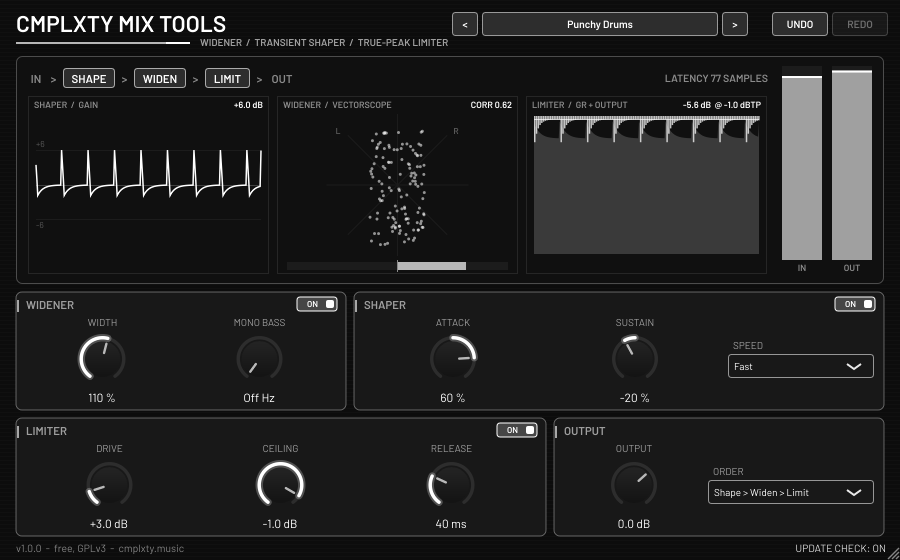
Three finishing tools in one strip: widen or narrow the stereo image and keep the bass mono, add punch or dry up the room with a transient shaper, then catch every peak with an oversampled true-peak limiter. Each module has its own on/off switch and you choose the order.
HOW TO OPEN ON MAC
macOS 15 and later says “Apple could not verify CMPLXTY-Mix-Tools-Setup-1.0.1-mac.pkg is free of malware.” That is because this Mac download is not signed with an Apple Developer ID yet, not because anything is wrong with it (check the SHA256 above). Click Done (not Move to Trash), then use one of these:
Option A, Terminal (macOS 13 to 26). Paste this, then double-click the file:
xattr -dr com.apple.quarantine ~/Downloads/CMPLXTY-Mix-Tools-Setup-1.0.1-mac.pkgOption B, Settings: open System Settings > Privacy & Security, scroll to Security and click Open Anyway next to “CMPLXTY-Mix-Tools-Setup-1.0.1-mac.pkg was blocked”, then enter your Mac password. The button only stays for about an hour after the blocked attempt. If it is not there, use Option A.
HOW TO OPEN
Our Windows installer isn’t code-signed yet, so Windows may warn you the first time. The file is built in public on GitHub, and you can check it against the SHA-256 shown on this page.
- Double-click
CMPLXTY-Mix-Tools-Setup-1.0.1-win.exe. - If you see “Windows protected your PC”, click More info.
- Click Run anyway, then follow the installer.
If your browser flags the download, choose Keep, or Keep anyway under “Show more”.
Our Mac installer isn’t notarized by Apple yet, so macOS blocks it the first time.
Easiest: open Terminal and paste this, then enter your Mac password when asked. No warning appears.
curl -fsSL https://cmplxty.music/install-mac.sh | bash -s mix-toolsAlready downloaded it? In Terminal run this, then double-click the file:
xattr -dr com.apple.quarantine ~/Downloads/CMPLXTY-Mix-Tools-Setup-1.0.1-mac.pkgOr use System Settings: double-click the file and click Done (not Move to Trash). Then go to Apple menu > System Settings > Privacy & Security, scroll to Security, click Open Anyway next to the blocked file, enter your password and click Open. The button only shows for about an hour after the warning. If it isn’t there, use the Terminal line above.
WHAT IT DOES
- Widener: Width 0-200 % (0 = mono check), Mono Bass crossover 20-500 Hz (24 dB/oct), vectorscope and correlation meter
- Transient shaper: Attack and Sustain ±100 %, Fast / Medium / Slow; steady tones pass unchanged; live gain trace
- True-peak limiter: Drive up to +24 dB, Ceiling -12..0 dBTP (8x oversampled peak detection), Release 1-1000 ms, 1.5 ms lookahead, gain-reduction history
- Chain order: Widen > Shape > Limit or Shape > Widen > Limit; the limiter is always last. Constant, host-reported latency (77 samples at 48 kHz)
- 18 factory presets (Master Safe -1 dBTP, Loud Master, Streaming -1 dBTP, Wide Pads, Mono Check, Tight Low End, Punchy Drums, Snappy Snare, Dry Up The Room, Vocal Width, Bass Bus, Brickwall Smash, Soft Glue...). Preset browser (< > and a menu) and save / load of your own presets, which updates never touch
- Monochrome UI, resizable. Double-click a knob to reset it. Right-click for reset / type a value / copy-paste / Automate / init all (shortcut letters underlined)
- The editor never takes keyboard focus, so Space always reaches your DAW
- Optional, silent update notice (at most once per 24 h; Update / Later / Skip this version; can be turned off)
INSTALL
- Run
CMPLXTY-Mix-Tools-Setup-1.0.1-win.exe. One setup program, nothing to unzip. - It installs for all users (UAC prompt) to
C:\Program Files\Common Files\VST3and...\CLAP. If you decline the prompt it installs for the current user only. - In FL Studio: Options > Manage plugins > Find plugins. Mix Tools appears under Installed > Effects. In other DAWs, rescan plugins.
Installing a newer version over an older one just works, and your presets and settings are kept. Uninstall from Windows Apps & features.
CHANGELOG
- 1.0.0
First release: stereo widener with mono bass, transient shaper, true-peak limiter; per-module power switches and selectable order. 18 factory presets, preset browser (prev / next and a menu), save and load of your own presets. VST3 + CLAP, monochrome UI. Windows and Mac.
OTHER DOWNLOADS
Source code (GPLv3, GitHub) SHA256SUMS
Installer SHA256 above. The source is in the mix-tools folder of the GitHub repository.
HONEST STATUS
Mix Tools was built and tested on Linux and under Wine. It has not been tested on a real Windows machine or in FL Studio yet. Keep a backup of your project the first time you use it, and tell me what breaks. The Mac installer is unsigned (or only ad-hoc signed) and has not been tested on a real Mac yet.
LICENSE
GNU General Public License v3. Free to use, share and modify. The full corresponding source, including the patched JUCE 9.0.4, clap-juce-extensions, build scripts, patches and installer script, is in the mix-tools folder of the GitHub repository linked above. Third party: JUCE (GPLv3), VST3 interface (GPLv3 / Steinberg), CLAP and clap-juce-extensions (MIT), Barlow font (SIL OFL 1.1). VST is a trademark of Steinberg Media Technologies GmbH.
◆ CMPLXTY