◆VISUALIZER
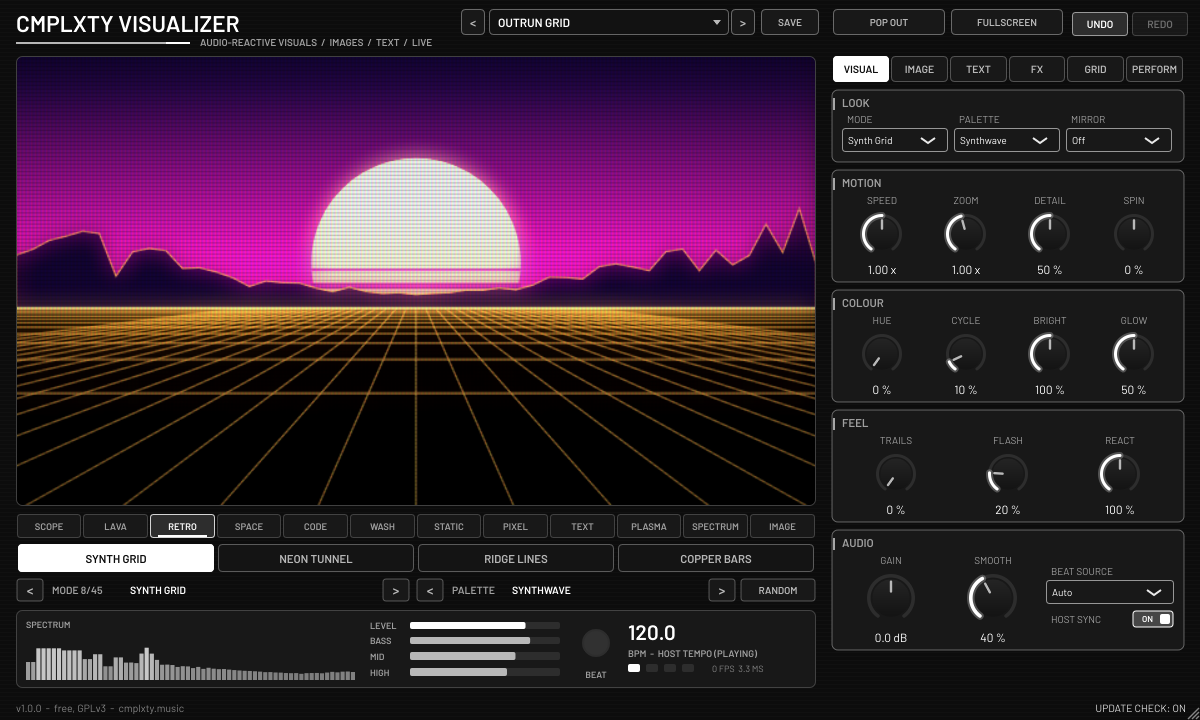
Free audio-reactive visualizer for your DAW: 45 visual modes, your own JPG/PNG pictures and lyrics reacting to the music, glass / texture / dither / tracking FX, a multi-screen grid up to 6x6 and a full-screen performance mode with a setlist on your laptop keys. Audio passes through untouched.
HOW TO OPEN ON MAC
macOS 15 and later says “Apple could not verify CMPLXTY-Visualizer-Setup-1.0.1-mac.pkg is free of malware.” That is because this Mac download is not signed with an Apple Developer ID yet, not because anything is wrong with it (check the SHA256 above). Click Done (not Move to Trash), then use one of these:
Option A, Terminal (macOS 13 to 26). Paste this, then double-click the file:
xattr -dr com.apple.quarantine ~/Downloads/CMPLXTY-Visualizer-Setup-1.0.1-mac.pkgOption B, Settings: open System Settings > Privacy & Security, scroll to Security and click Open Anyway next to “CMPLXTY-Visualizer-Setup-1.0.1-mac.pkg was blocked”, then enter your Mac password. The button only stays for about an hour after the blocked attempt. If it is not there, use Option A.
HOW TO OPEN
Our Windows installer isn’t code-signed yet, so Windows may warn you the first time. The file is built in public on GitHub, and you can check it against the SHA-256 shown on this page.
- Double-click
CMPLXTY-Visualizer-Setup-1.0.1-win.exe. - If you see “Windows protected your PC”, click More info.
- Click Run anyway, then follow the installer.
If your browser flags the download, choose Keep, or Keep anyway under “Show more”.
Our Mac installer isn’t notarized by Apple yet, so macOS blocks it the first time.
Easiest: open Terminal and paste this, then enter your Mac password when asked. No warning appears.
curl -fsSL https://cmplxty.music/install-mac.sh | bash -s visualizerAlready downloaded it? In Terminal run this, then double-click the file:
xattr -dr com.apple.quarantine ~/Downloads/CMPLXTY-Visualizer-Setup-1.0.1-mac.pkgOr use System Settings: double-click the file and click Done (not Move to Trash). Then go to Apple menu > System Settings > Privacy & Security, scroll to Security, click Open Anyway next to the blocked file, enter your password and click Open. The button only shows for about an hour after the warning. If it isn’t there, use the Terminal line above.
WHAT IT DOES
- 45 modes in 9 families: scopes (Glow, XY, Ring, Shape), liquid (Lava Lamp, Blob Pulse, Goo Contours), retro (Synth Grid, Neon Tunnel, Ridge Lines, Copper Bars), space (Starfield, Hyperspace, Nebula, Orbits), code (Code Rain, Glyph Storm, Binary Stream), colour (Color Wash, Gradient Sweep, Beat Blocks), broken TV (TV Static, Scanline Roll, Signal Lost), pixel (8-Bit Bars, Pixel Fire, Life Grid, Mosaic), type (Lyric, Glitch Type, Marquee, Word Wall), fluid (Plasma, Liquid Waves, Interference, Warp Swirl), spectrum (Spectrum Bars, Mirror Bars, Circle Spectrum, Radial Burst, Waterfall) and image (Image Pulse, Image Tiles, Image Slices, Image Pixelate)
- Your pictures: drop JPG / PNG files on the screen or use LOAD (up to 8). They PULSE on the beat, GLOW, SHAKE and CHROMA-split with the music, and can sit over or behind the visuals, multiply / screen, act as a MASK cut-out or as a TEXTURE the mode is painted with. Cycle pictures every beat or bar
- Text / lyrics: type your lines; they step on beats or bars with 7 animations (pulse, glitch, typewriter, flash, wave, zoom, shake). Drop a .ttf / .otf to use your own font
- FX: GLASS (lens, kaleido, ripple, prism, shards), TEXTURE (noise, grain, CRT, threshold, VHS), DITHER (symbol, star, hex, dots, Bayer), TRACK (boxes, brackets, crosshair, network tracking overlays)
- Multi-grid: 2x1 up to 6x6 screens, a different preset per tile, link modes (free, same, mirror, cascade, bands, beat swap)
- Performance mode: pop-out window or full screen (F11). A 36-slot setlist on the keys 1-0 and Q-M, arrows for next / previous, Enter = strobe (1/4 - 1/32, tempo-synced), Backspace = blackout, F1 = key help. These keys only work in the focused pop-out / full-screen window, so they never fight your DAW
- Analysis: level, low / mid / high bands, beat detection or host-tempo sync (beats follow the DAW transport)
- 34 palettes including 7 monochrome ones (Mono, Silver, Graphite, Noir, Paper, Mono Red, Mono Blue)
- 87 factory presets, a preset browser (< > and a menu), save / load of your own presets, optionally with the pictures inside
- 54 automatable parameters (mode, palette, motion, colour, FX, strobe, blackout...). Right-click any control for reset / type a value / Automate (shortcut letters underlined); double-click to reset
- Resizable monochrome UI. Pictures, text and fonts are saved with your project
- Software renderer with a frame cap (24 / 30 / 60 fps) and quality setting (Low / Medium / High / Ultra); no GPU driver needed
- The editor never takes keyboard focus, so Space always reaches your DAW
- Optional, silent update notice (at most once per 24 h; Update / Later / Skip this version; can be turned off)
INSTALL
- Run
CMPLXTY-Visualizer-Setup-1.0.1-win.exe. One setup program, nothing to unzip. - It installs for all users (UAC prompt) to
C:\Program Files\Common Files\VST3and...\CLAP. If you decline the prompt it installs for the current user only. - In FL Studio: Options > Manage plugins > Find plugins. Visualizer appears under Installed > Effects. In other DAWs, rescan plugins.
Installing a newer version over an older one just works, and your presets and settings are kept. Uninstall from Windows Apps & features.
CHANGELOG
- 1.0.0
First release: 45 modes, image layer with beat reactions and mask / texture blends, lyric text with custom fonts, GLASS / TEXTURE / DITHER / TRACK FX. Multi-grid up to 6x6, performance pop-out / full screen with a 36-key setlist, strobe and blackout. 87 factory presets, 34 palettes, user presets (optionally with images). VST3 + CLAP + standalone. Windows and Mac.
OTHER DOWNLOADS
Source code (GPLv3, GitHub) SHA256SUMS
Installer SHA256 above. The source is in the visualizer folder of the GitHub repository.
HONEST STATUS
Visualizer was built and tested on Linux and under Wine. It has not been tested on a real Windows machine or in FL Studio yet. Keep a backup of your project the first time you use it, and tell me what breaks. The Mac installer is unsigned (or only ad-hoc signed) and has not been tested on a real Mac yet.
LICENSE
GNU General Public License v3. Free to use, share and modify. The full corresponding source, including the patched JUCE 9.0.4, clap-juce-extensions, build scripts, patches and installer script, is in the visualizer folder of the GitHub repository linked above. Third party: JUCE (GPLv3), VST3 interface (GPLv3 / Steinberg), CLAP and clap-juce-extensions (MIT), Barlow font (SIL OFL 1.1). VST is a trademark of Steinberg Media Technologies GmbH.
◆ CMPLXTY