◆VVITCH
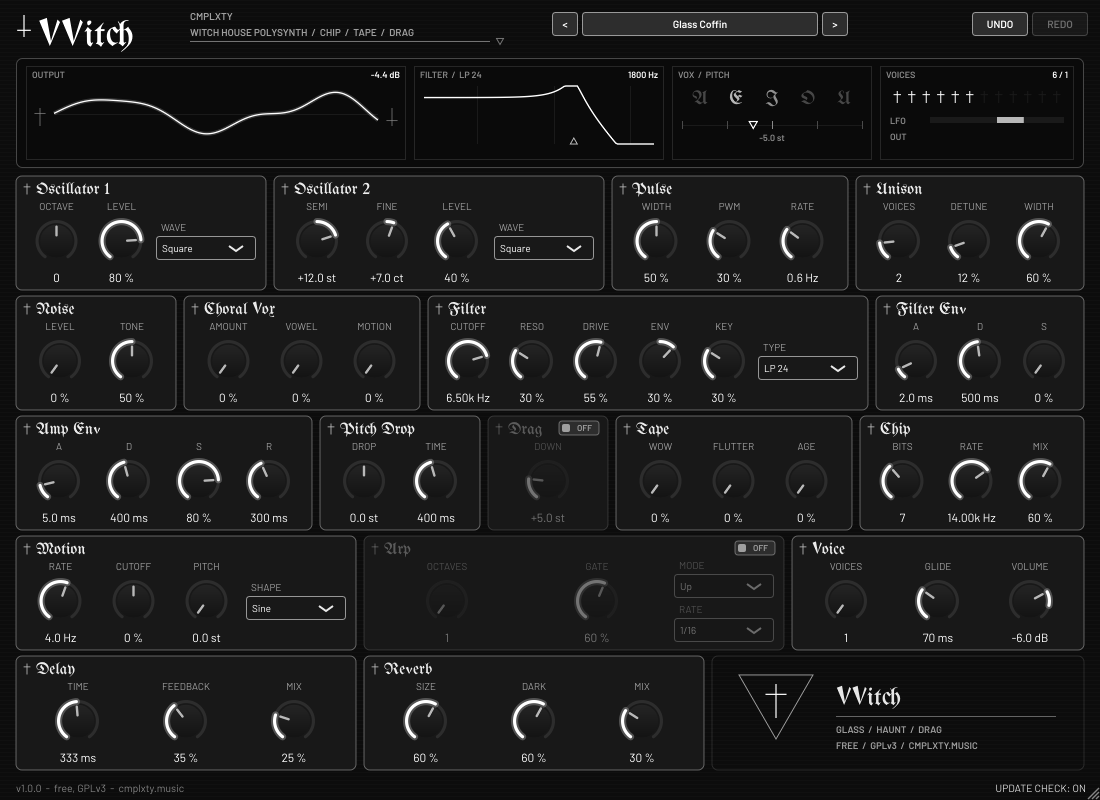
Free witch house synth: glassy detuned saws, chip-crushed screams, ghost-choir vowels, tape wow and a one-switch DRAG pitch-down, drowned in huge dark reverb, with 48 haunted presets.
HOW TO OPEN ON MAC
macOS 15 and later says “Apple could not verify CMPLXTY-VVITCH-Setup-1.0.1-mac.pkg is free of malware.” That is because this Mac download is not signed with an Apple Developer ID yet, not because anything is wrong with it (check the SHA256 above). Click Done (not Move to Trash), then use one of these:
Option A, Terminal (macOS 13 to 26). Paste this, then double-click the file:
xattr -dr com.apple.quarantine ~/Downloads/CMPLXTY-VVITCH-Setup-1.0.1-mac.pkgOption B, Settings: open System Settings > Privacy & Security, scroll to Security and click Open Anyway next to “CMPLXTY-VVITCH-Setup-1.0.1-mac.pkg was blocked”, then enter your Mac password. The button only stays for about an hour after the blocked attempt. If it is not there, use Option A.
HOW TO OPEN
Our Windows installer isn’t code-signed yet, so Windows may warn you the first time. The file is built in public on GitHub, and you can check it against the SHA-256 shown on this page.
- Double-click
CMPLXTY-VVITCH-Setup-1.0.1-win.exe. - If you see “Windows protected your PC”, click More info.
- Click Run anyway, then follow the installer.
If your browser flags the download, choose Keep, or Keep anyway under “Show more”.
Our Mac installer isn’t notarized by Apple yet, so macOS blocks it the first time.
Easiest: open Terminal and paste this, then enter your Mac password when asked. No warning appears.
curl -fsSL https://cmplxty.music/install-mac.sh | bash -s vvitchAlready downloaded it? In Terminal run this, then double-click the file:
xattr -dr com.apple.quarantine ~/Downloads/CMPLXTY-VVITCH-Setup-1.0.1-mac.pkgOr use System Settings: double-click the file and click Done (not Move to Trash). Then go to Apple menu > System Settings > Privacy & Security, scroll to Security, click Open Anyway next to the blocked file, enter your password and click Open. The button only shows for about an hour after the warning. If it isn’t there, use the Terminal line above.
WHAT IT DOES
- Detuned saw, square, PWM and triangle oscillators with up to 7-voice unison and stereo width, plus noise
- CHIP stage: bit depth and sample-rate crush for 8-bit grit
- TAPE: wow, flutter and age; per-note PITCH DROP; DRAG mode pitches everything down, chopped-and-screwed style
- Choral VOX: a morphing A-E-I-O-U formant stage for ghostly choirs
- Dark LP24 / LP12 / BP / HP filter with drive, its own envelope and an LFO
- Tempo-synced arpeggiator (Up, Down, Up-Down, Random, Chop), glide, mono legato
- Dark ping-pong delay and a huge dark reverb, plus a safety limiter
- 48 factory presets in Leads, Pads, Bass, Vox, FX and Keys + user preset save/load
- Monochrome gothic UI with blackletter headers; right-click any control to automate it; Space always reaches your DAW
- Built-in update checker (can be switched off). Free, GPLv3.
INSTALL
- Run
CMPLXTY-VVITCH-Setup-1.0.1-win.exe. One setup program, nothing to unzip. - It installs for all users (UAC prompt) to
C:\Program Files\Common Files\VST3and...\CLAP. If you decline the prompt it installs for the current user only. - In FL Studio: Options > Manage plugins > Find plugins. VVITCH appears under Installed > Instruments. In other DAWs, rescan plugins.
Installing a newer version over an older one just works, and your presets and settings are kept. Uninstall from Windows Apps & features.
CHANGELOG
- 1.0.0
First release: a free witch house polysynth with 48 presets. Windows and Mac.
OTHER DOWNLOADS
Source code (GPLv3, GitHub) SHA256SUMS
Installer SHA256 above. The source is in the vvitch folder of the GitHub repository.
HONEST STATUS
VVITCH was built and tested on Linux and under Wine. It has not been tested on a real Windows machine or in FL Studio yet. Keep a backup of your project the first time you use it, and tell me what breaks. The Mac installer is unsigned (or only ad-hoc signed) and has not been tested on a real Mac yet.
LICENSE
GNU General Public License v3. Free to use, share and modify. The full corresponding source, including the patched JUCE 9.0.4, clap-juce-extensions, build scripts, patches and installer script, is in the vvitch folder of the GitHub repository linked above. Third party: JUCE (GPLv3), VST3 interface (GPLv3 / Steinberg), CLAP and clap-juce-extensions (MIT), Barlow font (SIL OFL 1.1). VST is a trademark of Steinberg Media Technologies GmbH.
◆ CMPLXTY