◆QUARTZ
A vocal chain inspired by Alice Glass style vocals, plus an ALTER section for pitch, formant and gender. Free VST3 for Windows. It is new, so tell me what breaks.
HOW TO OPEN ON MAC
macOS 15 and later says “Apple could not verify CMPLXTY-Quartz-Setup-1.0.5-mac.pkg is free of malware.” That is because this Mac download is not signed with an Apple Developer ID yet, not because anything is wrong with it (check the SHA256 above). Click Done (not Move to Trash), then use one of these:
Option A, Terminal (macOS 13 to 26). Paste this, then double-click the file:
xattr -dr com.apple.quarantine ~/Downloads/CMPLXTY-Quartz-Setup-1.0.5-mac.pkgOption B, Settings: open System Settings > Privacy & Security, scroll to Security and click Open Anyway next to “CMPLXTY-Quartz-Setup-1.0.5-mac.pkg was blocked”, then enter your Mac password. The button only stays for about an hour after the blocked attempt. If it is not there, use Option A.
HOW TO OPEN
Our Windows installer isn’t code-signed yet, so Windows may warn you the first time. The file is built in public on GitHub, and you can check it against the SHA-256 shown on this page.
- Double-click
Quartz-Setup-1.0.5.exe. - If you see “Windows protected your PC”, click More info.
- Click Run anyway, then follow the installer.
If your browser flags the download, choose Keep, or Keep anyway under “Show more”.
Our Mac installer isn’t notarized by Apple yet, so macOS blocks it the first time.
Easiest: open Terminal and paste this, then enter your Mac password when asked. No warning appears.
curl -fsSL https://cmplxty.music/install-mac.sh | bash -s quartzAlready downloaded it? In Terminal run this, then double-click the file:
xattr -dr com.apple.quarantine ~/Downloads/CMPLXTY-Quartz-Setup-1.0.5-mac.pkgOr use System Settings: double-click the file and click Done (not Move to Trash). Then go to Apple menu > System Settings > Privacy & Security, scroll to Security, click Open Anyway next to the blocked file, enter your password and click Open. The button only shows for about an hour after the warning. If it isn’t there, use the Terminal line above.
WHAT’S NEW IN 1.0.4
- Quartz is now on Mac. The Mac .pkg is above (unsigned, untested on a real Mac). The Mac build reads its own update info, so Mac users get pointed at the Mac download. No sound changes.
NEW IN 1.0.3
- Space and the other DAW transport keys now work after you click or drag a knob. Before, Quartz held on to the keyboard after a knob click, so Space never reached your DAW’s play/pause until you clicked out of the plugin.
- The right-click menu shortcuts (C, V, D, E, A) and typing a value still work. Quartz only takes the keyboard while a menu or the type-a-value box is open, then hands it back to your DAW.
- Trade-off: Ctrl+Z and Ctrl+Y no longer fire right after a knob click, because Quartz no longer holds the keyboard. The UNDO button and the menus still work.
1.0.3 is new. It was tested under Wine (a Windows stand-in) and has not yet been tested in real FL Studio on real Windows. If Space still doesn’t reach FL after you click a knob, tell me. Keep a backup of your project the first time you use it.
WHAT IT DOES
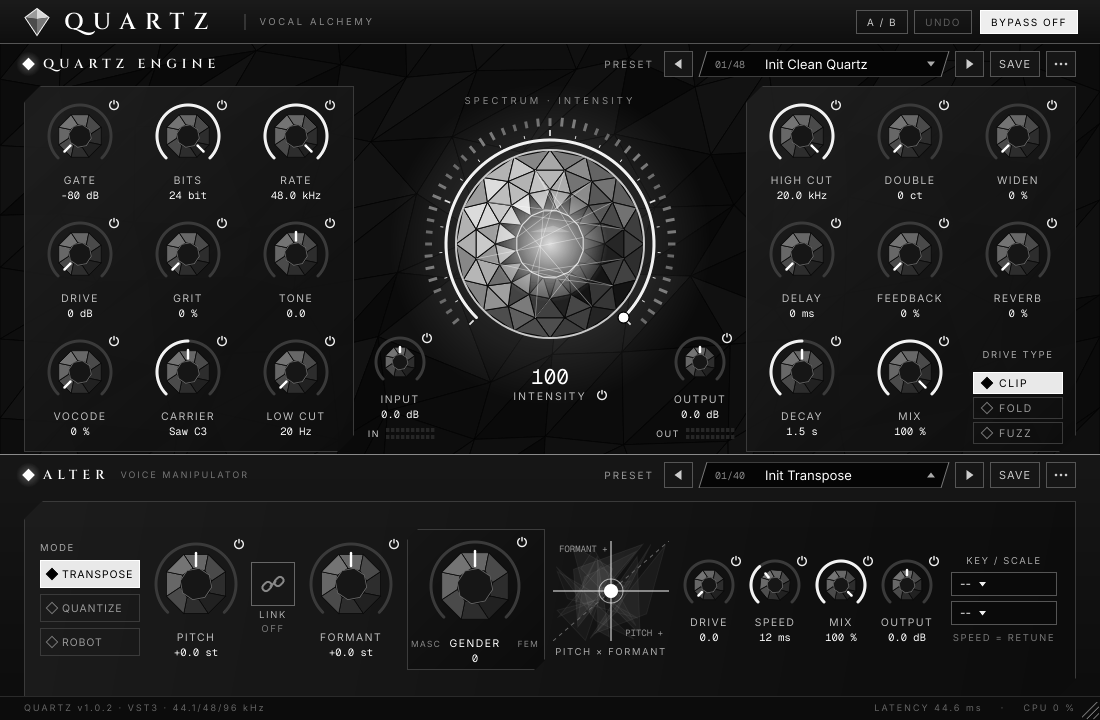
Quartz is the vocal chain: gate, crush, drive (clip, fold or fuzz), grit, a vocoder, filters, double, widen, delay and reverb. The gem in the middle is one INTENSITY knob that takes it from clean to full power.
ALTER sits below it and runs first. Pitch, formant and a Gender knob that goes from masculine to feminine, plus transpose, quantize and robot modes.
Each section has its own preset selector and its own on/off diamond. Every knob has its own bypass.
Automate any knob from FL’s plugin wrapper parameter list or Last tweaked. In 1.0.2 you can also right-click a knob or a diamond and choose Create automation clip.
INSTALL
- Run
Quartz-Setup-1.0.5.exe. - In FL Studio open Options > Manage plugins > Find installed plugins.
- If the installer put it in your user folder (it asks you if you do not have admin), add
C:\Users\<you>\AppData\Local\Programs\Common\VST3under the plugin search folders, then scan again.
Quartz shows up under Effects. With admin rights it installs to C:\Program Files\Common Files\VST3\Quartz.vst3.
UPDATES
Quartz checks this site once a day and shows a popup when a newer version is out. Click Update to open this page, or just download the newest installer from here yourself. Close FL Studio before running it. The installer updates in place and keeps your presets. To turn the update notice off, click the version text in the plugin footer. Your user presets live in %APPDATA%\Quartz and the installer never touches them.
UNINSTALL
Windows Settings > Apps > Quartz > Uninstall, or the Uninstall Quartz shortcut in the Start Menu. Your presets in %APPDATA%\Quartz stay put until you delete that folder.
CHANGELOG
- 1.0.4 · Oct 29 2026
First Mac version (.pkg). On a Mac, update checks point to the Mac download. No sound changes. Windows and Mac. - 1.0.3 · Oct 28 2026
Space and the other DAW transport keys now still play/pause your DAW after you click or drag a knob. Right-click menu shortcuts and typing a value still work. Ctrl+Z / Ctrl+Y no longer fire right after a knob click (the UNDO button still works). - 1.0.2 · Oct 28 2026
Double-click to reset, right-click menu with shortcuts (C, V, D, E, A), automation clips from knobs and diamonds, Key and Scale default to --, diamond fix, GENDER retune, in-plugin update notice. - 1.0.1 · Oct 28 2026
First public release.
OTHER DOWNLOADS
Manual install (VST3 zip, version 1.0.5) Source code (AGPLv3, GitHub) SHA256SUMS
Installer SHA256 above.
VST3 zip (1.0.5) SHA256 091502c014766bcdfc08f290ff643559614c6defe3a0ac7ddbb060a47049ac98
TESTING AND LICENSES
Quartz passed load, install, update and uninstall tests on Windows 11. It is new and not yet tested in every DAW, so keep a backup of your project the first time you use it.
Quartz is free software under the GNU AGPLv3. The source is in the quartz folder of the GitHub repository. The fonts are under the SIL Open Font License. Built with JUCE. Full notices are in the VST3 zip (LICENSES.txt) and the installer.
◆ CMPLXTY